


Trading Room - Forex signals a
4.575.00 Reviews
App Specs
- Version
- 2.9
- Updated On
- License
- Free
- Downloads
- 100,000+
- Developer
- Finansoft Ltd
- Categories
- Finance
- Platform
- Android
Screenshots
 Analysis by AppCompare
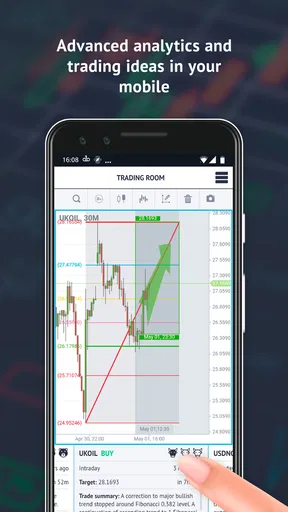
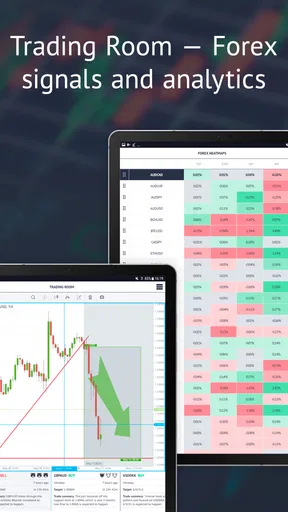
I approached Trading Room - Forex signals a as a finance app for people who want market ideas and a quicker way to inspect currency movement, rather than as a complete replacement for a broker or a personal trading plan. Its focus is clear: it brings together daily trading ideas and an FX heatmap so I can move from a broad view of the market to a more focused question about a currency pair.
That narrow purpose is also what makes it easier to judge. I would not recommend it simply because it is free to install or because it has a strong 4.5 average from around 2.6 thousand ratings. I would recommend it when the user understands what signals and visual analysis can—and cannot—do. The app is most useful as a research companion. It is less suitable for someone looking for automated investing, a full charting workstation, or a beginner-friendly course that explains every trading term from the ground up.
How the app feels to read and navigate
I find that readability and navigation matter most when I want a quick market check without turning it into a rushed decision. This section looks at how a focused screen can help me keep an idea and its context together, while also noting why I would test text size and visual clarity before relying on it regularly.
A focused starting point for market ideas
The first strength I noticed is that the product has a more defined job than many general finance apps. Instead of trying to be a bank account, portfolio tracker, news reader, and brokerage interface at once, it centers attention on trading ideas and the FX heatmap. That focus can reduce the mental effort involved in deciding where to look first, especially when I open the app with a specific question such as whether a currency is showing broad strength or weakness.
The daily ideas are easier to use when I treat them as prompts for investigation, not instructions to follow blindly. I prefer to read an idea, identify the pair or market direction it discusses, and then compare that suggestion with the wider heatmap view. This two-step habit is more useful than opening a signal and immediately acting on it, because the heatmap can provide context that a single trade idea may not show on its own.
For readers who are comfortable with basic foreign-exchange language, the interface concept should be fairly approachable. The main challenge is not necessarily finding the central tools; it is understanding what each piece of market information means and how quickly it may become outdated. A clean screen cannot remove the need to interpret terms such as strength, weakness, direction, entry, or risk.
Readability matters more than visual excitement
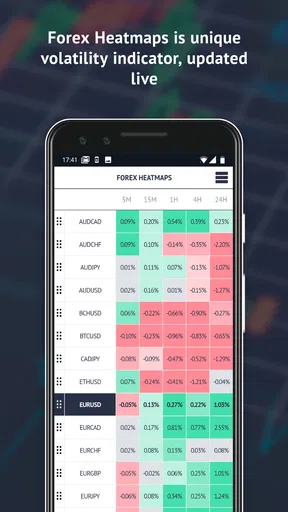
Financial apps often tempt designers to fill the screen with colors, arrows, and changing figures. In this case, the FX heatmap is potentially valuable because it compresses a large amount of currency information into a visual overview. I find that useful when I want to scan relationships quickly instead of opening several individual charts.
Worth Reading Before You Choose

EA SPORTS FC Mobile 26 Is a Bigger Football Game, but It Takes Time

Flipboard Shows What News Apps Must Do Beyond the Feed

Switching to Android Auto Means Rethinking Your Driving Routine

Google Calendar Makes a Crowded Week Easier to Manage

Ludo King Makes the Most of the Minutes Between Plans

Baby Panda World Brings Quick Play to Modern Phones, but Its Game Library Feels Busy
At the same time, a heatmap can be harder to read for someone with color-vision differences, low vision, or difficulty distinguishing subtle shades. A color-based signal should never be the only reason I make a decision. I would always look for the associated text or numerical context, when available in the relevant view, and verify the same idea through another source before risking money.
The app’s age rating is Everyone, which makes it broadly suitable from a content perspective, but that should not be confused with being equally easy for every ability level. Trading vocabulary, fast-changing information, and compact visual summaries can still create barriers for new users or people who need more explanation.
Useful reading habits for new users
My practical suggestion is to avoid scanning every idea as though it deserves equal attention. I would first choose a small watchlist of currencies that matter to my own interests, then use the heatmap to spot unusual contrasts before reading the related ideas in detail. That workflow prevents the daily feed from becoming a stream of disconnected suggestions.
I would also keep a simple note of why an idea seemed convincing at the time. Writing down the market context, the reason for considering it, and what would invalidate the idea helps separate the quality of the analysis from the result of one trade. This is one of the most important ways to use a signals app responsibly: judge the reasoning and the process, not just whether a particular call happened to work.
Using the heatmap and ideas across different abilities
The heatmap can make currency relationships easier to scan, but its color-led presentation may not suit every reader or display setup. I’ll look at how I would pair that visual overview with written ideas and a slower review habit, so the tool supports different levels of experience rather than encouraging anyone to trade on a glance.
Motor considerations and the cost of speed
Trading Room is better suited to short reading and scanning sessions than to users who need to perform many precise actions under time pressure. A person with limited dexterity may find it easier to review ideas calmly, save their own notes elsewhere, and place any eventual order through a separate broker with controls designed for execution. I would not rely on a compact finance app as the only environment for urgent trading decisions when tapping accuracy is difficult.
This distinction is important because the app is a research tool in my workflow, while the broker is the place where money is actually committed. Separating those tasks creates a useful safety layer. I can inspect a market idea in Trading Room, pause, confirm the pair and direction, calculate an appropriate position size, and only then use the broker. That extra pause is helpful for anyone who is prone to accidental taps, rushed decisions, or fatigue.
For users who navigate with larger text, magnification, voice control, or other device-level assistance, the experience will depend on how the app’s own screens respond to those settings. I would test the most important path before depending on it: opening an idea, reading its details, switching to the heatmap, and returning to the relevant information without losing my place. If any control becomes cramped or unclear, the app may remain useful for occasional review but not for frequent monitoring.
Sensory load and visual interpretation
The heatmap’s visual format is both its most distinctive advantage and its main sensory consideration. A quick color pattern can communicate market relationships faster than a long list, but it can also become tiring when the screen contains strong contrasts, many changing cells, or several competing signals. I would use it in short sessions and avoid treating the brightest color as an automatic buy or sell message.
Users who are sensitive to flashing, dense visual movement, or high-contrast layouts may prefer to rely more heavily on the written trading ideas and use the heatmap only for occasional confirmation. Conversely, someone who struggles with long paragraphs may appreciate the ability to scan a visual market overview first. The same design choice can therefore help one person and hinder another.
Audio access is another practical question for people who cannot comfortably read a screen for long periods. I would not assume that an app centered on visual market analysis will provide a complete spoken alternative. A user who depends on screen reading should test whether labels, figures, and navigation controls are announced in a meaningful order. If the heatmap is conveyed only through color and position, spoken access may be limited even when surrounding text is readable.
Language, knowledge, and cognitive accessibility
The biggest barrier for many people will be financial rather than physical: the app expects the user to make sense of trading information. A newcomer can easily mistake a concise idea for a guaranteed forecast, especially if they have never worked with stop levels, position sizing, volatility, or the difference between analysis and execution.
I would use the app alongside a dependable glossary or educational source during the first sessions. That is not a criticism of its central concept; it is a reminder that a short signal cannot carry all the teaching a beginner needs. If I had no experience with foreign exchange, I would spend time learning the basic terminology before considering any live transaction.
The developer, Finansoft Ltd, presents a product aimed at active market observation rather than a simplified savings experience. That makes it more appropriate for a curious learner who is willing to research, an experienced trader who wants another viewpoint, or a user who already has a broker and needs a compact idea feed. It is less appropriate for someone who wants plain-language budgeting guidance or long-term portfolio management.
When situational access makes the app useful—or risky
A short check during a quiet break can be useful; the same glance while distracted can leave important context behind. Here I consider when situational access helps me form questions for later research and when it is safer to close the app until I can concentrate properly.
Short sessions during an ordinary day
A realistic use case is checking the app during a lunch break. I might open the latest ideas, scan the heatmap to see whether the currencies mentioned are moving in a broader pattern, and write down one or two questions to investigate later. This works well because I am using the app for orientation, not trying to complete an entire trading process while distracted.
The same situation becomes risky if I am walking, commuting, caring for a child, or switching repeatedly between work and the market. Financial information deserves more attention than a quick social notification. I would rather read the app at a desk, with enough time to verify the pair and understand the idea, than make a rushed decision from a glance at the screen.
Accessibility when concentration is limited
People with migraines, fatigue, attention difficulties, or temporary illness may benefit from a strict routine: review only a few relevant ideas, take breaks from the visual map, and avoid monitoring every movement. The app can support a structured check-in, but it can also encourage over-monitoring if I keep returning to changing colors and fresh suggestions throughout the day.
One useful boundary is to decide in advance what information would justify further research. For example, I might use the heatmap to identify a meaningful currency contrast, then close the app and examine the idea later. This reduces cognitive overload and makes the tool serve my plan instead of becoming the plan.
Using it with a separate broker
Trading Room is not the alternative I would choose if I wanted one app to handle analysis, account funding, order placement, and portfolio records in one place. A broker normally offers the execution controls and account-specific information needed to place trades, while this app’s appeal is the independent view of ideas and currency relationships.
That separation can feel inconvenient, especially for users who value a single streamlined dashboard. I see it as a trade-off rather than an automatic weakness. Keeping research and execution apart makes it harder to act impulsively, but it also means I must manually confirm details and move between tools. Anyone with limited dexterity or concentration should decide whether that extra step is manageable before building a routine around it.
Remaining barriers, costs, and practical limits
A free download lowers the barrier to trying the app, but paid items and the limits of signals still deserve careful thought. I’ll focus on how I would assess whether an added purchase fits my actual research routine, and why device comfort and a separate execution tool remain practical considerations.
Signals are not a personal risk plan
The most important limitation is conceptual. A daily trading idea is not the same as advice tailored to my income, savings, debts, tax position, risk tolerance, or financial goals. Even a well-presented market view cannot know how much loss I can afford. I would never use an idea as a substitute for position sizing, a written risk limit, or independent research.
The heatmap has a similar limitation. It can help me see relative currency behavior, but a visual relationship does not explain every economic event, spread, execution delay, or sudden reversal. It is a starting point for questions, not a complete model of the foreign-exchange market.
Free access does not mean cost-free trading
The app is free to install, which makes it easy to try without an upfront purchase. It also contains in-app purchases ranging from $15.99 to $79.99 per item. I would check exactly what a paid item unlocks and whether it changes the workflow I actually need before spending money. A premium feature is only worthwhile if it saves meaningful time or adds analysis I can understand and use responsibly.
There is also a psychological cost to paid signals. Once I have paid for access, I might feel pressure to follow more ideas or trade more often to justify the purchase. I would avoid that trap by deciding beforehand what role the app has in my process and by measuring success through better research discipline rather than the number of trades made.
Version, device age, and testing before commitment
The current version is 2.9, and the app supports devices running Android 7.1 or later. That broad operating-system range may help people using older Android hardware, but an older phone can still make dense financial screens less comfortable to read or interact with. I would test the heatmap and the full idea-reading path on the actual device I plan to use, not assume that compatibility guarantees a comfortable experience.
Before paying for anything, I would spend several sessions checking whether the text is readable, whether I can distinguish the heatmap’s information without strain, and whether I can move between sections without losing context. Users who depend on accessibility settings should perform that test with their normal font size, display scaling, contrast preferences, and input method.
Who should choose another option
I would skip this app if my main goal were household budgeting, bill reminders, passive investing, or a beginner course with extensive explanations. A conventional budgeting app or a long-term investment platform would be a better match for those needs. I would also look elsewhere if I required a fully integrated trading terminal with advanced charting and direct order execution.
I would be cautious about recommending it to anyone who tends to treat predictions as certainty. The app may provide a useful second opinion, but no signal feed removes market risk. If a person is not prepared to verify ideas, accept losses, and limit exposure, adding more signals is unlikely to solve the underlying problem.
My inclusive verdict after using it as a research companion
I see Trading Room as a focused finance app with a sensible pairing: daily ideas for discovering possible setups and an FX heatmap for viewing currency strength in a wider context. Its compact purpose is a genuine advantage for experienced users and motivated learners who want a quick market check without opening a full desktop platform.
Its accessibility is more mixed. The focused workflow can make short research sessions manageable, and the visual heatmap may help users who prefer patterns over long text. However, color-dependent interpretation, trading jargon, changing information, and the need to move between research and execution can create real barriers. People with visual, motor, cognitive, or attention-related needs should test their own device and assistive setup rather than assume the Everyone rating answers those practical questions.
With over 100 thousand installs, the app has clearly found an audience, and the 4.5 average suggests that many users value its approach. I would still treat those figures as context, not proof that it fits every trader. My recommendation is strongest for someone who already has a broker, understands basic forex concepts, and wants a structured way to generate research questions.
My bottom line: use it to widen your view, not to outsource your judgment. I would begin with the free experience, compare the ideas against the heatmap and another trusted source, and keep execution separate until the workflow feels clear and comfortable. For that kind of disciplined user, the app can be a practical daily companion. For someone seeking certainty, simplicity, or fully integrated trading, a different finance tool will be the better choice.
Pros
- Clear forex signal notifications help users track potential trade setups.
- Useful for beginners learning how analysts assess currency-market opportunities.
- Signals can save time compared with researching every currency pair manually.
- A focused interface keeps trading-related information easy to find.
- Convenient mobile access lets users monitor alerts while away from a computer.
Cons
- Signals are not guaranteed and may result in substantial financial losses.
- Some features or signals may require a paid subscription.
- Signal timing can be affected by internet or notification delays.
- Limited context may make it difficult to judge a trade independently.
- Forex trading requires risk management and experience beyond following alerts.
FAQs for Trading Room - Forex signals a
What is Trading Room - Forex signals, and how does it work?
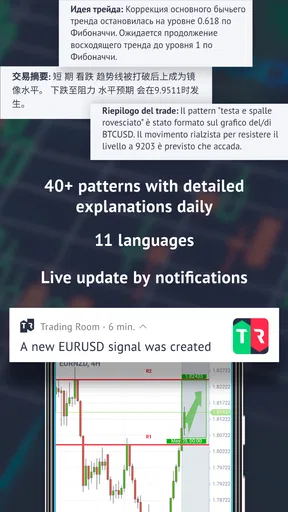
Trading Room - Forex signals is an app designed to provide forex market ideas, alerts, and trading information for users who want assistance identifying possible entry and exit opportunities. Signals may include details such as the currency pair, suggested direction, entry level, stop-loss, and take-profit targets. The app is an analysis tool, not an automatic guarantee of profitable trades.
Is Trading Room - Forex signals suitable for beginners?
The app can be useful for beginners because it presents trading ideas in a more structured format than analyzing the market entirely alone. However, new traders should understand basic forex concepts, including leverage, spreads, risk management, and order types before following any signal. Beginners should start with a demo account and avoid risking money they cannot afford to lose.
Are the forex signals accurate, and can I rely on them to make profits?
No forex signal service can guarantee accurate predictions or consistent profits. Market conditions can change quickly because of economic announcements, volatility, liquidity, and unexpected events. Signals provided through Trading Room - Forex signals should be treated as research or educational guidance rather than financial advice. Always verify the reasoning behind a signal and use sensible risk controls.
Does Trading Room - Forex signals place trades automatically?
Users should check the app’s current features and permissions before downloading, because signal applications can differ in how they handle trade execution. In general, a forex signal app provides alerts or recommendations that users review and execute through their own broker, unless a clearly stated integration supports automation. Never grant trading access without understanding the connected broker, permissions, and security implications.
Is Trading Room - Forex signals free to download and use?
The application may be available to download without an upfront charge, but some features, signal groups, premium analysis, or subscription services may require payment. Pricing, trial periods, renewal terms, and available tools can change over time, so review the store listing and in-app purchase information carefully. Also consider broker fees, spreads, commissions, and possible currency conversion costs.


